Six city robots, six repairs
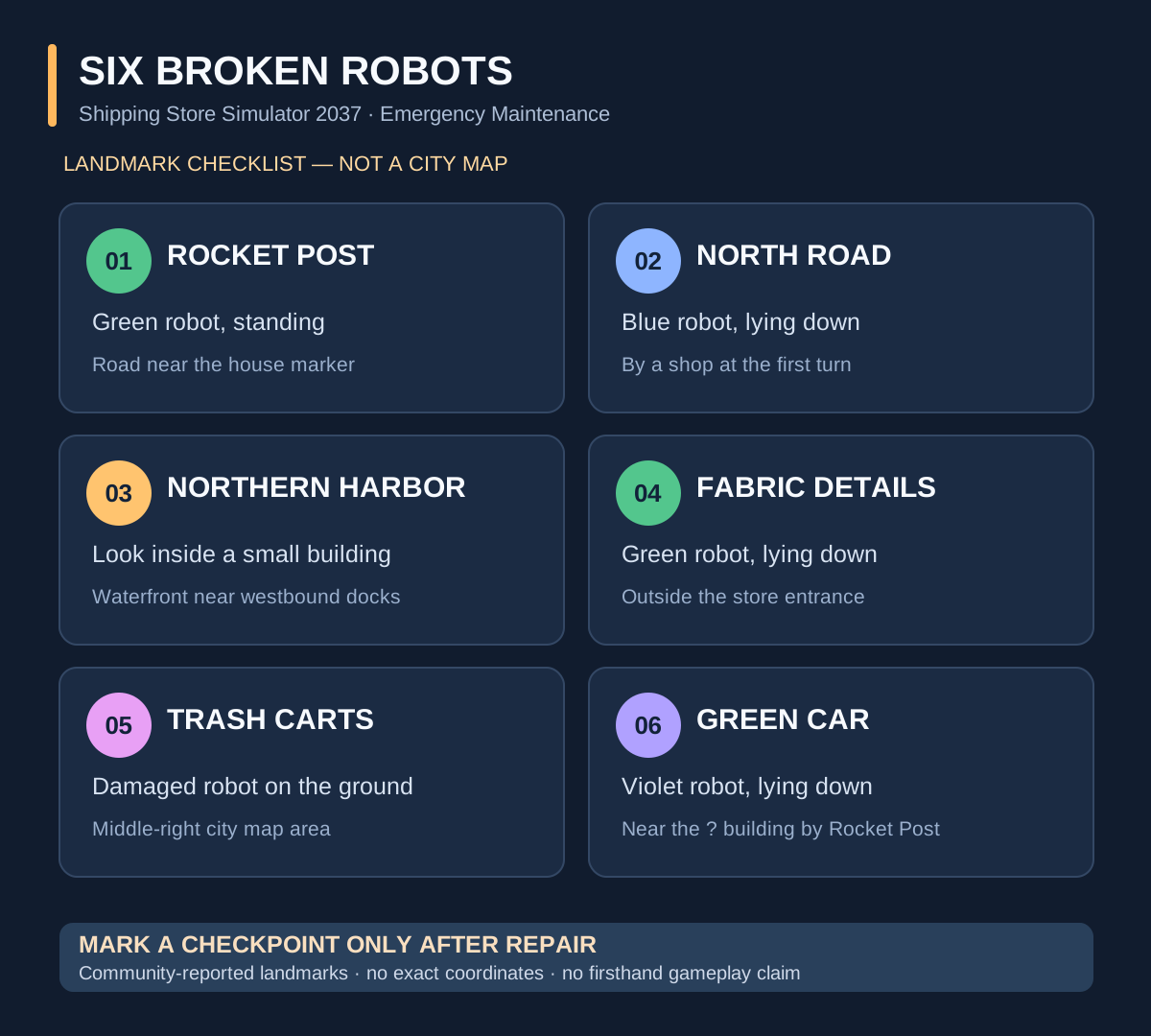
To work toward Emergency Maintenance in Shipping Store Simulator 2037, track down six damaged robots around Cranelock and repair them. Bring repair kits: merely locating one does not complete the repair. The six reported search areas are Rocket Post, the road north of it, inside the small northern-harbor building, Fabric Details, the trash-cart area and a green car beside a question-mark building near Rocket Post. Confirm each repair in the progress tally before moving on.
Most useful clue if you are stuck at five: The harbor robot is reported inside a small building near the northern waterfront. In the original Steam map discussion, players said an early northern marker was misleading; a player supplied a more specific approach from the road heading west to the docks. Don’t search only for a robot standing outside at the extreme top-left map edge. Read the player correction on Steam.
This is a community-sourced full-release route checklist, not a developer-issued coordinate map or a claim that GGClue has personally completed the achievement.
Before searching: which robots count?
The game also has warehouse employees and equipment that wear down and require maintenance. Playstrom’s developer diary documents the repair-kit system and how damaged machines and robots can be restored. The Emergency Maintenance task described in player guides, however, concerns the six damaged robots out in the city, not simply repairing one of your regular warehouse workers. Developer’s maintenance explanation · Community achievement guide.
Bring repair supplies when you leave the warehouse. The checked sources do not prove a universal kit price, vendor location, number of kits you can carry at once, or a mandatory order for the six city repairs. Check the inventory and supplies available in your own save rather than following demo-only shopping advice.
November 9 version check and why game screenshots still matter
The developer’s November 9 Patch 1.0.4 fixed the placement of several objects around the city, UI issues and added a visible current-version label. It does not say any of the six broken achievement robots moved. The October player landmarks below remain a source-backed checklist, but if a robot is absent, check the real patch version and don’t guess a new coordinate. The developer’s October 26 patch separately fixed some achievements without specifically naming Emergency Maintenance or guaranteeing old-save retroactive awards.
Exact English competitor benchmark: Steam’s Shipping Store Simulator 2037 guides page lists a picture-based “Broken Robots All Location w/ pics” guide and a separate annotated six-location map. GGClue’s current original SVG is only a text landmark checklist, not a usable city map, so it does not reach their visual route standard. To pass visual acceptance, obtain six genuinely recorded current-build screenshots, each with the robot and recognizable street/building landmark; a real harbor-warehouse interior approach; and a real full city map annotated using the owner’s images and permission. Do not download/rehost those community maps or invent an in-game street layout.
The six broken robot locations: landmark checklist
Use each row as a search-and-repair checkpoint. Numbering is for tracking progress, not an official route order.
| Check | Search area | What to identify |
|---|---|---|
| 1 | Rocket Post / your home | A green robot standing still on the road, to the left of the house marker in published player directions. |
| 2 | Road north of Robot 1 | A blue robot lying outside a shop at the first turn north of the first location. |
| 3 | Northern harbor | A small waterfront warehouse/building near the docks; look inside rather than relying only on a map pin. |
| 4 | Fabric Details | A green robot lying outside the shop entrance. This is a different green robot from the one standing near Rocket Post. |
| 5 | Trash carts | A robot lying beside trash carts in the middle-right portion of the player’s map. |
| 6 | Question-mark building near Rocket Post | A violet/purple robot next to a green car near the question-mark-marked building closest to your base. |
These identifying landmarks were reported in the October 16 community location guide. They are not precise coordinates. After each encounter, verify that you actually completed the repair before marking the row off.
Six-repair progress tally (copy into your notes or print): These boxes are plain text, not clickable progress tracking. Tick a location only when you have completed the repair, not merely when you have found the robot. If you cannot confirm the repair, leave it unchecked.
- ☐ Rocket Post road: upright green robot repaired.
- ☐ First northern road turn: blue robot outside the shop repaired.
- ☐ Northern harbor: robot inside the small waterfront building repaired.
- ☐ Fabric Details entrance: separate green robot repaired.
- ☐ Trash carts: robot beside the carts repaired.
- ☐ Green car near Rocket Post: violet robot repaired.
If you are at five confirmed repairs, review the unchecked location first. This is your own checklist; it is not an in-game quest counter or proof that Steam has awarded the achievement.
For a different problem—a van or cart stuck in the world—see the vehicle reset and control settings guide. That does not repair the six city robots or replace the Emergency Maintenance checklist above.
Can’t find the last robot? Check the harbor first
The northern harbor has the best-documented source of map confusion. In comments under a six-location Steam community guide, one player reported that the robot could not be found at the top-left pin. Another explained that the target was instead in the harbor area along the north waterfront, among the smaller shoreline buildings. That guide’s author later stated the map had been updated. Steam guide and player comments.
Try narrowing the search this way:
- Identify the main road that runs west toward the large docks/harbor structure.
- Follow the northern waterfront area and look for small buildings near the shoreline, rather than scanning the road edge alone.
- Inspect the small warehouse/building described by community route reports. The comments also place the target northwest of the billboard beside one of the question-mark buildings.
- If you locate the robot, use the game’s available repair interaction and check that the repair has completed.
Two different question-mark landmarks — do not treat them as one destination:
- Harbor search (robot 3): The question-mark building and billboard are orientation cues in community directions. Follow the westbound dock road, then check the smaller northern-waterfront buildings; the robot is reported inside a small harbor building.
- Near Rocket Post (robot 6): Use the question-mark-marked building closest to your base as the landmark. The target here is the violet robot beside a green car, not the harbor robot.
These clues come from the community landmark descriptions, not independently measured in-game coordinates. Do not infer the two locations are connected by a verified shortest route.
The precise harbor doorway, updated map-pixel position and an in-game repair prompt have not been verified through first-hand GGClue testing. If you need an exact screenshot, consult the original player’s illustrated guide rather than treating the diagram above as a game map.
What if Emergency Maintenance does not unlock?
The developer’s October 26 update says it fixed an issue where some achievements could not be unlocked. The announcement does not name Emergency Maintenance or say whether the change applies to an existing save. Treat it as relevant patch context, not confirmation that this specific achievement is fixed. Check your installed game version, then verify the six distinct repairs in your save.
First check the distinction between finding six robots and repairing six robots. Use the six-repair tally above to reconcile which repairs you can actually confirm; leave uncertain entries unchecked. The two green robots are easy to mix up; the harbor robot may not be visible from the road; and the violet robot is by the green car near your base, not at the harbor landmark.
These are verification steps, not a proven fix for an achievement bug. The checked official sources do not establish a universal console command, save-edit, restart sequence or forced unlock procedure. Avoid deleting a save or replacing game files based on an unverified tip.
Frequently asked questions
How many broken robots are there?
Community location and achievement guides identify six damaged city robots for Emergency Maintenance. The official developer diary describes repair kits but does not publish the six-location map. Steam community guide.
Where is the robot most people miss?
Community comments specifically flag the north harbor and an originally confusing marker. Search the small shoreline building near the west-bound road to the docks. A separate player guide also lists the northern harbor warehouse. Original report · Landmark descriptions.
Do routine repairs on warehouse employees count?
The published six-location task concerns robots found around the city. The warehouse’s own employee maintenance system is a separate gameplay activity. Don’t treat one routine warehouse repair as proof you completed a city robot checkpoint.
Is this the June demo map?
No. The community material used here was posted around October 15–16, 2026, immediately after the PC full release on October 14. No claim is made that the locations remain unchanged after every future update. Official release information.
Sources and verification notes
- Official Playstrom Steam update history — October 26 achievement note
- October 26 patch note archive — some achievement-unlock failures were addressed; Emergency Maintenance is not named.
- Official Steam product page — PC release and developer
- Playstrom’s September 23 robot maintenance diary — repair kit mechanics
- October 15 Steam six-location map and harbor corrections in comments
- October 16 published six landmark descriptions
Research method, checked October 26, 2026: Compared developer descriptions with community walkthroughs and the original Steam conversation, including a corrected early map marker. This page has not been independently reproduced from a GGClue-owned game recording, and the infographic is a newly drawn text-based checklist rather than an in-game screenshot. For van, tablet and delivery incidents, return to the Shipping Store Simulator 2037 game hub.