Step 1 — Work out which save you’re trying to load
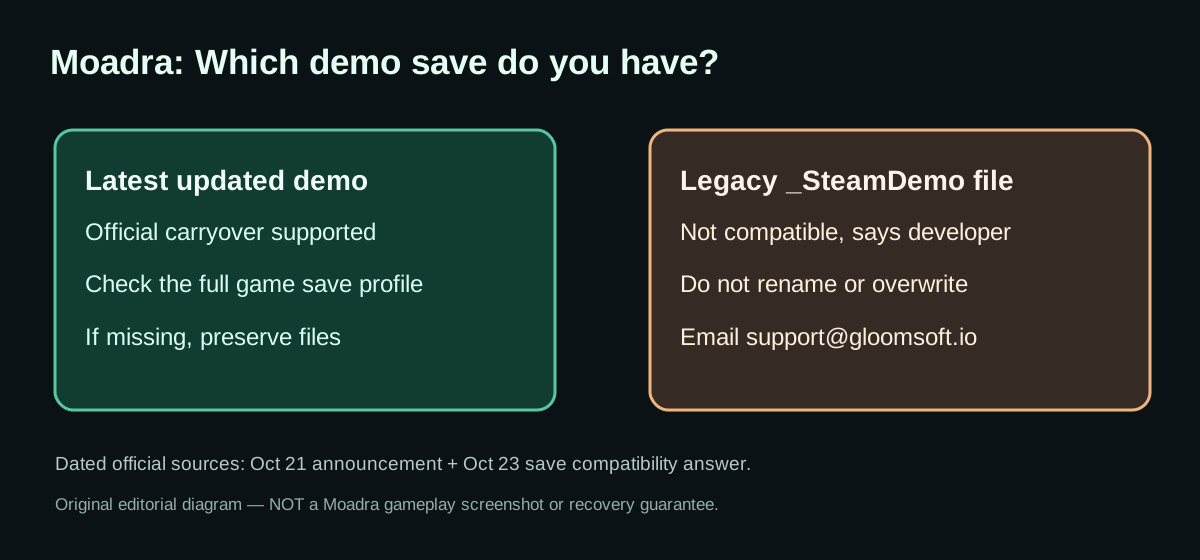
The developer’s October 21 announcement says the refreshed demo has save progress that carries over. This is the intended path for current players. A new player’s report on October 23 showed why the wording needs a qualification: their older file name included MoadraSaveGame1_SteamDemo_110.sav, and both the latest demo and full game did not recognize it. Gloomsoft explained that files from older demo versions with the _SteamDemo suffix do not work in the updated releases.
| What you have | What the developer has confirmed | What to do |
|---|---|---|
| Progress created in the refreshed October 2026 demo | Carryover to the full game is supported | Launch the full game on the same Steam account and check existing save profiles; if missing, preserve files and ask support |
A file whose name contains _SteamDemo from an older version |
Not compatible with the latest demo or full game | Do not rename or overwrite; contact Gloomsoft after purchase |
| A save that is simply missing, with version unknown | Cause not established | Record your version and file names; don’t assume a delete/reinstall will help |
These are evidence-backed categories, not a diagnosis of every PC’s file system. Neither the publisher’s answer nor our research confirms a safe manual save-conversion method.
Step 2 — Before trying changes, protect the existing data
- Stop experimenting with the affected profile. Repeatedly creating new saves makes it harder to distinguish original progress from new files.
- Preserve a copy of any existing save files outside the game’s working folder. If you do not know which files are relevant, leave them as-is and let support advise.
- Record the exact filename, game/demo version, and what the save-selection screen displays. For example, write whether it offers only a new profile, not merely “lost progress.”
- Do not delete config or save files as a generic repair. Older developer instructions for resetting demo graphics options are for a different symptom, not a fix for save incompatibility.
- Contact the developer with the evidence. State that you bought the full game, when you played the old demo, the suffix on your save file, and whether both demo and full game fail to recognize it.
Step 3 — What to send to Gloomsoft
Gloomsoft’s support address for this situation is support@gloomsoft.io. A concise report should include the Steam platform, purchase and demo timing, the approximate point reached, filenames, whether the updated demo lists any save, and an unobstructed screenshot of the profile screen if you can provide one. Ask whether assistance for your version is possible. Do not send private credentials or Steam login details.
The developer said they could help affected players continue their progress in some circumstances. That is an offer of assistance, not a publicly documented one-click restore. Only follow file edits or replacement instructions once they are appropriate for your specific save.
What happens to demo achievements?
In the October 21 update, Gloomsoft said achievements earned in the demo are recorded locally and unlock on your Steam account once the full game is purchased and launched. That statement is not a claim that any particular older incompatible progress file is automatically imported. If your achievements do not appear, record the demo version you played and ask support rather than manipulating unknown achievement files.
How many save slots does the full game have?
A player asked whether more than one person could play independently without sharing a single run. On October 23, Gloomsoft answered that three save profiles are available. Use a different profile for a separate run; profile count does not guarantee cross-device synchronization or recovery of overwritten progress. If a profile seems empty after an update, check before overwriting it.
FAQ
Does every demo save transfer? No. The new demo supports progress carryover; legacy saves with _SteamDemo in the filename do not work in the current demo or full game according to Gloomsoft.
Can I just remove _SteamDemo from a filename? Do not assume renaming converts its format. The developer described a compatibility problem, not a naming-only problem.
Does uninstalling fix the missing save? There is no verified statement that it does. Preserve what you have and contact support first.
Will support definitely recover all my progress? No outcome has been guaranteed. Gloomsoft offered help to certain players who purchased the game and recently completed the old demo.
Are there separate save profiles? Yes, three, confirmed by Gloomsoft in a separate Oct 23 discussion.
Official sources
- Oct 21: updated demo, carryover and achievements
- Oct 23: incompatible old
_SteamDemosaves and Gloomsoft support - Oct 23: three save profiles
- Moadra official store
Related: Moadra help hub · Controls and Steam Deck
Independent GGClue editorial guide. Not endorsed by Gloomsoft. This guide explains documented compatibility limits; it does not promise account or save restoration. Last checked: October 23, 2026.