Status: The developer says T.16000M joysticks now work after v0.1.1 detection/configuration changes; the reported dual-device 0/2 case remains unconfirmed. Checked: November 3, 2026. Version: Early Access through 0.1.3.1; exact device/build behavior not independently tested.
The official October 23 v0.1.1 announcement says T.16000M joysticks now work with improved detection and configuration. October 25 v0.1.2.1 adds improved joystick setup, single-joystick support and separate control profiles for different vehicles. The developer still lists some joystick compatibility and input problems, and neither update names the reported two-device 0/2 state or the FarmStick pairing. October 30 v0.1.3.1 adds customizable control hints but does not establish that this dual-device issue is fixed. Operating-system device recognition and the game’s own device list remain separate checks. The new low-FPS comparison guide addresses a different task, not missing joystick detection. Compare the official update history with the v0.1.1, v0.1.2.1 and v0.1.3.1 patch-note archives.
Why “0/2 joysticks” is different from “nothing works”
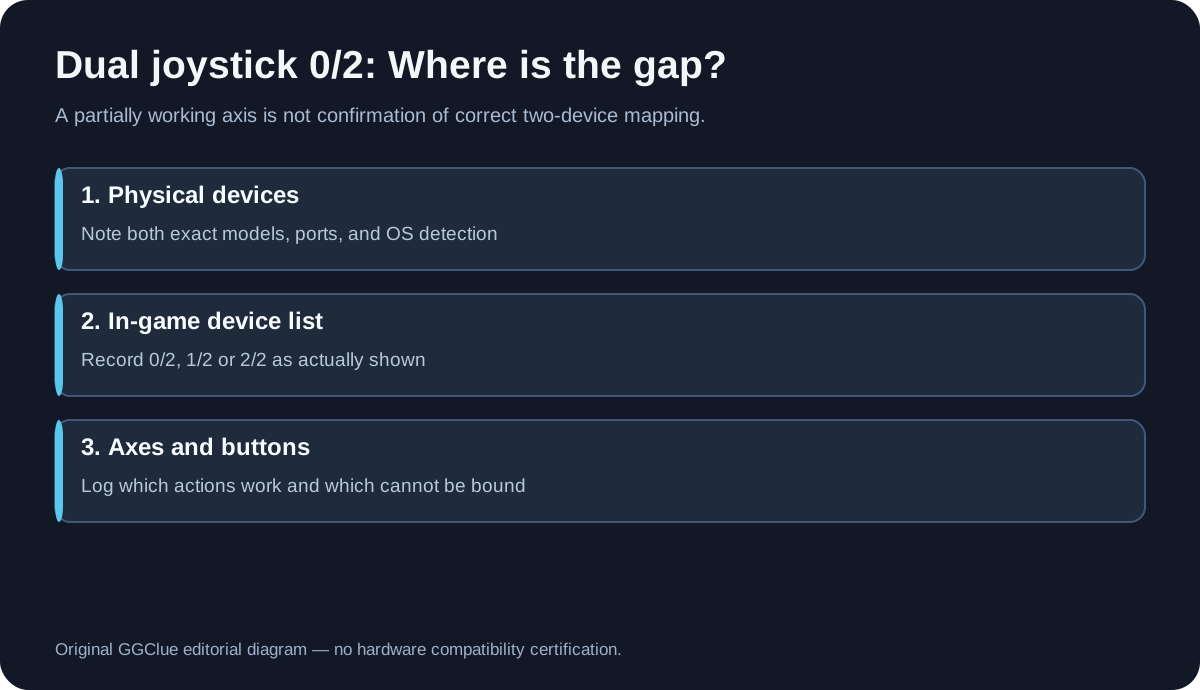
Users in the dual joystick discussion describe a split between what the game says and what they can physically do: the on-screen setup count displays zero detected joysticks while certain buttons or movements can still control the game. This suggests that some input is reaching the software, but it does not prove that the correct two-device mapping is supported. Another person described a left stick responding while the right did not. The right question is therefore not merely “are the sticks powered?”; it is which devices the system sees, which devices the game lists and which axes can actually be configured.
Step-by-step evidence checklist
- Identify each device exactly. Write down the manufacturer and full model (for example T.16000M FCS versus SIMTASK FarmStick) and which is used on the left and right. Models should not be assumed interchangeable.
- Check detection outside Groundwork. On Windows you can inspect the operating system’s game controller/device listing to see whether both physical USB devices appear. This is a generic device diagnostic, not a Groundwork game fix.
- Check what the game itself reports. With the game open, note whether the joystick count is 0/2, 1/2 or 2/2, and whether both sticks are listed separately. Do not guess the name or exact location of a binding menu that has not been independently verified for the installed build.
- Try one control at a time without risking progress. Identify whether axes, buttons, menu navigation or only one stick’s functions respond. A response from one axis does not mean two-device support is correct.
- Record other connected controllers. State whether a gamepad or other steering device is also connected and whether the reported count changes. An observation may help the developer; it is not a reason to publish a universal disconnect-all-USB fix.
- Report the 0/2 state and the actual input behavior. Include a screenshot of the game’s device listing if possible, names of both devices, your operating system and game version in the developer’s official Steam or Discord feedback channel.
What players have and haven’t established
| Reported observation | Reasonable conclusion | What is not proven |
|---|---|---|
| Two T.16000M devices appear as 0/2 in-game | The reported game’s detection or mapping state is not usable for that player | That all T.16000M units are unsupported |
| One stick moves a machine, right stick cannot be assigned | At least one input path reaches the game | That bindings can be automatically repaired by Steam Input |
| FarmStick buttons trigger some actions but controls cannot be configured | Partial input can coexist with setup failures | That a third-party configuration file fixes the problem |
| Someone reports the same device works in another simulation | The physical device can work somewhere else | That Groundwork supports the other game’s profile or menus |
Players reported dual devices and button-mapping problems. The developer’s v0.1.1 notice explicitly says T.16000M joysticks now work with improved detection/configuration; v0.1.2.1 adds single-joystick support and separate vehicle profiles, while also noting remaining device-specific controller issues. These are real support changes, so it would be inaccurate to say no model-specific joystick fix was released. They still do not certify the two-device 0/2 case or FarmStick pairing. The v0.1.3.1 control-hint changes do not supply that missing confirmation.
Should you use Steam Input, a joystick emulator or a downloaded profile?
The evidence gathered here does not validate a specific Steam Input profile, emulator, third-party executable or controller mapping for this game’s current build. You may investigate the official Steam client configuration as a general input setting, but avoid treating a generic profile as a confirmed fix. Do not install untrusted files or executable profiles from unknown sites merely because they promise “0/2 fixed.”
Useful support report template
Subject: Groundwork Simulator Early Access — dual joystick 0/2 and incomplete axis mapping
Device 1: [exact model, left/right]
Device 2: [exact model, left/right]
Operating system: [Windows/macOS, version]
Steam game version/build: [what you can confirm]
OS sees: [both / one / none]
Game displays: [0/2, 1/2, etc.]
Inputs that still work: [specific axis/buttons]
Inputs that fail: [specific axis/buttons]
Other controllers connected: [yes/no/model]
Attach a cropped screenshot showing only the game or non-sensitive device listing. This keeps the developer report actionable without exposing private data.
Visual: Show the official developer gameplay overview as true game context, plus the independently authored three-layer input diagnostic graphic. The developer video does not show your exact connected devices or prove joystick compatibility. Alt: “Editorial diagram of hardware detection, game joystick enumeration and axis mapping in Groundwork Simulator.” Caption: “Original diagnostic chart, not an in-game controller settings screenshot.”
FAQ
Does Groundwork Simulator officially support two Thrustmaster joysticks?
The developer says T.16000M joysticks now work with improved detection/configuration in v0.1.1, and v0.1.2.1 adds single-joystick support and separate vehicle profiles. That is positive official support evidence, but it does not verify two T.16000M devices showing 0/2 or establish a complete dual-device compatibility matrix. The FarmStick pairing remains unverified.
If I see 0/2, should I replace my hardware?
Not based on these reports alone. Check whether the operating system recognizes the hardware before blaming the physical device; the game may separately be unable to assign it correctly.
Can I copy my setup from another construction simulator?
Not safely as a guaranteed solution. A profile for another game can use different axes, buttons and mapping systems.
Was this repaired in the first update?
The v0.1.1 announcement says T.16000M joysticks now work with improved detection/configuration, and v0.1.2.1 adds single-joystick support and vehicle profiles. Neither release specifically says that two devices showing 0/2 or the FarmStick pairing is fixed. Check the notes and your exact device/build rather than assuming all pairings behave alike.
Sources
Dual-joystick players’ firsthand thread · Official Groundwork update history · v0.1.1 patch note archive · v0.1.2.1 patch note archive · v0.1.3.1 patch note archive · Groundwork Simulator Steam store.
GGClue is an independent fan guide. This content is based on published update notes and reported device behavior, not on a physical test rig or official compatibility certification. Last verified November 3, 2026.
Related: Groundwork Simulator help hub · crash on startup menu unresponsive · spray paint crash