First, identify the graphics device actually running the game
On Windows, open Task Manager → Performance and inspect the GPU device names, or use Device Manager → Display adapters. A laptop can contain both an integrated chip and a dedicated graphics card, so record both if present. These Windows inspection steps are general operating-system guidance, not a menu unique to Chained Beasts.
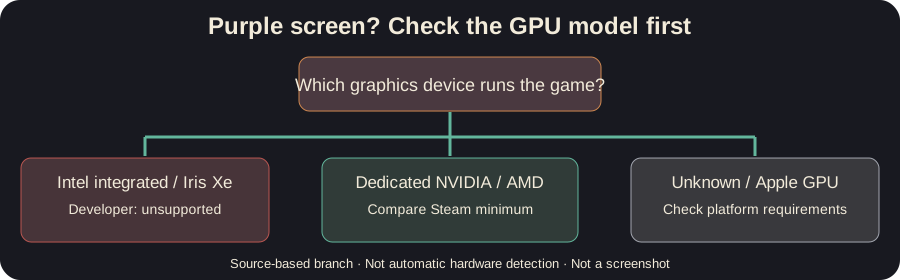
If the only displayed graphics device is Intel Iris Xe or another Intel integrated model, compare it against the developer’s published support statement and official minimums below. An Intel Core i7 CPU or 16 GB RAM does not automatically compensate for an unsupported GPU. The Steam case involved an Acer laptop with an Intel Core i7-1195G7, 16 GB RAM and Intel Iris Xe.
If your machine also has a dedicated NVIDIA or AMD GPU, verify which adapter the game actually uses using Windows graphics preference controls, then compare that GPU with the game’s stated minimum. Avoid claiming that selecting a discrete GPU necessarily fixes every purple screen; it is simply the first sensible compatibility check.
Official Windows minimums, not a performance guarantee
| Component | Steam minimum as checked October 15, 2026 |
|---|---|
| OS | Windows 10, 64-bit |
| CPU | Intel Core i5-5257U, AMD Ryzen 3 1200 or equivalent |
| Memory | 8 GB RAM |
| GPU | GeForce GTX 1050, AMD RX 460 or equivalent |
| Local same-screen co-op | At least one gamepad required |
Source: official Steam requirements. A graphics adapter that merely has a higher-looking model number is not necessarily equivalent; verify against actual specifications. These minimums do not specify a target frame rate or resolution.
For macOS, Steam lists macOS 11 and Apple M1 / Radeon Pro 450 configurations in its minimum fields (the storefront representation can vary by platform and update). Intel integrated-graphics warnings in a Windows discussion do not automatically establish all Mac GPU compatibility. Recheck your platform-specific Steam page before purchasing.
Safe checks in order
- Record the exact symptom. Does the game become purple before the menu, during scene loading, or only after joining a session? Does audio continue? Photograph the screen only for your own diagnostic records if needed.
- Check GPU type and official minimum. If the available GPU is outside the supported baseline, do not promise a launch parameter, driver hack, mod, reinstall or lowered resolution will make it supported.
- If you have a supported discrete GPU, make sure that adapter is selected. On systems with switchable graphics, use the OS graphics preference or manufacturer control panel. This is a general troubleshooting suggestion, not a developer-published Chained Beasts patch.
- Check for released game updates. Let Steam finish any pending update and verify the install files using Steam’s built-in integrity check if you suspect corruption. Neither is established as a cure for an unsupported GPU.
- Ask the developer with precise details. Provide GPU model, driver version, OS, whether the issue occurs in demo/full release, whether menus are accessible and whether a discrete GPU is available. Start with official Steam discussions.
What not to do
Do not download unsolicited executable “GPU fixes”, swap game DLLs from unknown forums, assume a mod removes a hardware floor or claim that deleting your saves resolves a rendering incompatibility. If the game was purchased on a machine below published requirements, consult Steam’s own support and refund policy rather than misleading yourself with an unverified magic fix.
Frequently asked questions
My CPU is fast. Can Intel Iris Xe still be unsupported? Yes. A CPU specification and a GPU support statement describe different components. In the cited thread, the developer explicitly responded that Intel integrated graphics were unsupported.
Will updating my driver solve it? A newer driver can resolve some graphics bugs generally, but the developer’s unsupported-hardware statement is not overturned by that possibility. We have not verified a driver fix for this game’s Iris Xe case.
Does the purple screen prove my computer is broken? No. It can indicate a game/hardware compatibility problem and should not by itself be used to diagnose physical hardware failure.
What if I have a GTX 1050 or RX 460 and still see purple? You match one published graphics model baseline, but a separate bug or configuration may be involved. Collect the version and reproduction steps, then report it instead of assuming the Intel-specific reply explains your case.
Related checks
The official Steam requirements are the hardware baseline. Run the local-only session checklist; if your problem is input rather than video, see multiplayer input checks. Publisher screenshots are not copied here because a specific monetized rehosting license was not documented.