Restore an online co-op run: the reported launch flow
- Find out who hosted the original session. The developer specified a checkpoint associated with the online host. A friend who joined someone else’s run should not assume the restore option will appear when they host instead.
- Have that same host open a new lobby. Do not assume the button is available on the main title screen, or that a different player’s lobby will find the old run.
- Let everyone reconnect. The developer’s explanation places the restore action after the players have reassembled in the new lobby.
- Look for the checkpoint restore option. It is conditional: the developer said a restore button appears if a checkpoint is available. The wording alone does not establish what happens after a crash before the first checkpoint.
- Restore the last available day start. Expect a day-start checkpoint, not a precise return to the moment where the game was closed. The behavior in your build is authoritative if a patch later changes it.
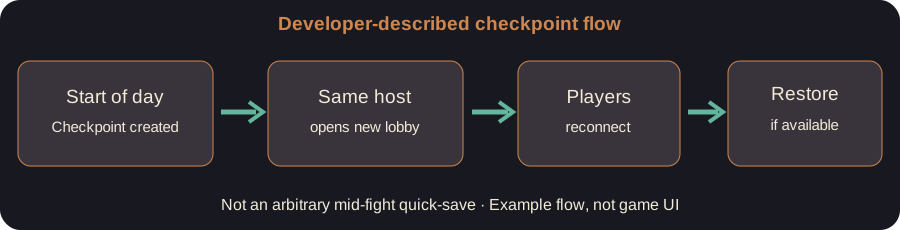
The points above are a faithful restatement of a public developer reply. We have not simulated a host disconnect, Steam Cloud conflict or multi-platform reconnection. Do not confuse a sensible sequence with guaranteed recovery.
What about solo play?
In the same discussion, a player asked whether the answer applied to single-player rather than just co-op. A developer said the checkpoints worked in solo as well, after clarifying that an earlier reply had been posted from an account not marked as developer. Therefore the checkpoint principle is officially supported for solo mode. The exact title-screen location of a continue button was not independently verified in this research. Launch the same game installation, look for the available restore/continue action and avoid starting a new run if you are unsure whether doing so could replace your stored checkpoint.
What does “mid-run” mean here?
There is an important difference between mid-campaign and mid-combat. The developer’s description refers to a checkpoint saved at the start of each day. If the game is closed later that day, the most you can reasonably infer is that a restore is associated with that checkpoint — not that every weapon pickup, point of damage and last-second boss movement will be preserved. The forum response does not provide a complete save-file format, multiple save slots, rollback history, or Steam Cloud merge policy.
What to check when the restore button is missing
Are you in the launch version rather than an old demo? Earlier in the thread, a tester saw no continue option in the demo. A developer explained the full restore feature was coming with launch. Updating to the relevant game build is more important than repeating a demo workaround.
Is the same person hosting? For online games, have the original host open the room again. A different host is not the documented restore route.
Did the session reach a day-start checkpoint? The official wording guarantees neither a checkpoint before the first day begins nor a separate checkpoint mid-combat.
Did the other players return before restoration? The cited sequence says to have the group reconnect first, then use the available restore action.
Still missing? Capture the current build number if the game shows one, whether the game was solo or co-op, which player hosted, the last completed day, and whether a restore button is visible. Report this information in the official Steam discussions rather than deleting unknown save files or downloading an unverified “save repair” tool.
A sample run timeline
This is an invented explanatory example, not a transcript from a played session. Imagine finishing Day 2, starting Day 3, then closing during a Day 3 arena fight. The developer’s description indicates a Day 3 start checkpoint as the intended recovery point. It does not prove that the partially completed fight is saved. If the host starts a new lobby, the option is conditional on that checkpoint actually being present.
Frequently asked questions
Can any co-op participant restore the session? The developer described the original host as the one who can open a lobby with the checkpoint. There is no verified general hand-off mechanism in the cited thread.
Does it work offline? The reply confirms solo checkpoints, but does not fully specify offline authentication requirements or platform-specific storage. Do not claim an offline guarantee.
Is there manual quick-save? The cited statement discusses automatic day-start checkpoints. It does not announce manual saves at any time, so do not promise one.
Did the demo support checkpoint restore? The forum contains an older report that the demo did not show a usable restore option, followed by a developer statement that the feature would be available at launch. Do not use the old demo as a definitive launch-build test.
Relevant visual and sources
Publisher screenshots are not copied into this site because a specific monetized rehosting license was not documented. The official Steam game page and publisher release announcement provide game context; neither image is a restore-menu demonstration. Try the interactive session checklist if you need to choose the next step. Independent fan-made guide, not endorsed by the developers.