Choose what actually happened, and this simple checklist will point you to the most relevant source-checked next step. We do not detect your GPU, read Steam files or connect to your game. Your answers are used only to display guidance in this browser. A source-based next check is not a guarantee that it will fix your session.
No account · No uploads · No hardware scanning · Choices are not saved or sent.
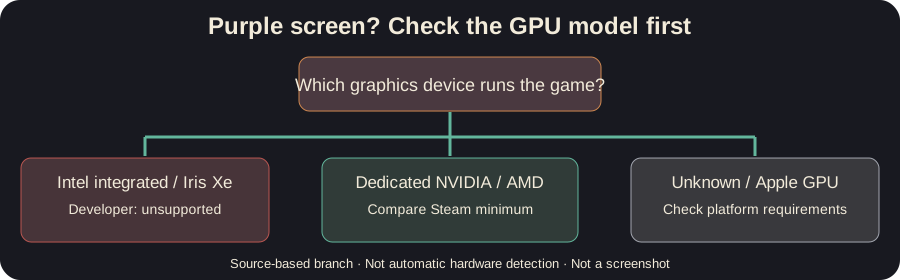
How it works
This is a short decision aid, not a diagnostic app connected to your game. Each possible answer maps to a documented help page and a cited limitation. You can change your answer and immediately see a different branch. Nothing is stored after refresh. If the information still does not fit your session, the responsible next action is to gather a reproducible report and read the official community updates.
An example
Imagine a Windows laptop whose only listed GPU is Intel Iris Xe. You select Purple/blank game image and Intel integrated / Iris Xe. The result directs you to the developer’s unsupported-integrated-GPU statement, rather than promising to fix a rendering compatibility limit by restarting the game. This is an illustrative example, not a log from a real player’s machine.
Frequently asked questions
Can this tool inspect my actual hardware? No. You type the information yourself; there is no OS or Steam API access.
Does it fix the game automatically? No. It points to evidence-checked next steps; it cannot update drivers, repair saves or change game files.
Does it keep or upload my choices? No. The tool maintains temporary in-page state only. Choices are not saved or sent. Site-wide analytics are described on the Privacy page.
Sources
- Official Steam requirements
- Developer purple-screen response
- Historical demo input report and developer replies
- Developer checkpoint discussion
For product identity and updates, see the official Steam game page. This is an independent fan-made support page, not affiliated with Featherweight Games or Steam.